
SaaS Customer Onboarding: What Most Guides Get Wrong
Most SaaS customer onboarding advice follows the same script: assign a CSM, schedule a kickoff call, define milestones, check in at 30/60/90 days. That playbook exists for a reason, and it works for the right type of company. But it assumes every SaaS product has (or should have) a customer success team guiding users through the door.
For many SaaS products, that’s not the case. If you’re running a self-serve or low-touch product, your product is the onboarding. There’s no CSM. There’s no kickoff call. There’s a user who signed up, landed in your app, and is now deciding whether to stay or close the tab.
This post is about that side of customer onboarding. The product side. Where the decisions that matter most happen before you write a single onboarding email or build a single tooltip.
Onboarding is a company problem, not a department problem
Most onboarding guides are written from a single perspective. CS guides focus on kickoff calls, check-in cadences, and health scores. Product guides focus on tooltips and checklists. Marketing guides focus on email sequences. Each one treats onboarding as their department’s problem to solve.
Onboarding doesn’t belong to any single team. Marketing sets expectations before the user signs up. Sales (if you have it) qualifies whether the customer is a good fit. CS guides them through the early days. Product shapes the experience itself. When onboarding breaks down, the root cause is often a misalignment between these functions, not a failure in any one of them. A Reddit post in r/CustomerSuccess put it well: one company improved their 180-day logo retention by 2,500 basis points, and the fix required coordination across sales, CS, and product. Not heroics from one team.
This post focuses on the product side, because that’s where I have experience and because it’s the angle that gets the least coverage. But keep in mind: none of this works in isolation. The best product-level onboarding still fails if marketing attracts the wrong users or sales closes bad-fit customers.
Self-serve vs. CS-led: your price point decides
Customer onboarding exists on a spectrum from fully automated to fully human-driven, and your position on that spectrum shapes which advice applies to you.
I like to think about this in terms of how many zeros your MRR has per customer:
- One zero ($99/mo or below): No-touch. The product does all the onboarding. You can’t afford to put a human in the loop at this price point, and your users don’t expect it.
- Two zeros ($999/mo or below): Low-touch. Maybe an onboarding email sequence, a webinar, or a CS rep who checks in once. The product still does most of the work.
- Three or more zeros ($1,000+/mo): High-touch. Dedicated CSM, kickoff calls, implementation support. The product supports the human process.
This isn’t a hard rule. I’ve seen low-price products offer white-glove onboarding as a competitive differentiator. But as a starting heuristic, it’s useful: the price point tells you how much human involvement the business model can sustain.
Worth noting: even at the high-touch end, basic product-level onboarding (a simple checklist, well-designed empty states, a clear first action) reduces the burden on CS. Relying entirely on humans with zero in-product guidance is almost never the right call. I’ve worked at a company where the product literally dropped new users on an empty list page with no guidance. It was CS-led, so it didn’t kill retention outright, but it created a constant stream of “what do I do now?” tickets that the product could have prevented with a single CTA.
Steps to value: the metric that matters more than you think
You’ve probably heard of “time to value,” the idea that users should experience your product’s core benefit as quickly as possible. It’s good advice. But I think a better way to frame it is steps to value: how many discrete actions does a user need to take between signing up and experiencing something useful?
Time is one dimension. Complexity is another. A user might reach value in 5 minutes, but if those 5 minutes require 15 clicks across 4 different screens with 2 context switches, the experience feels heavy even though the clock says it was fast.
Here’s a concrete example from my own category (SaaS onboarding tools). Most products in this space require you to install a browser extension to build your first onboarding flow. The steps look like this:
- Sign up for the product
- Leave the app, go to the Chrome Web Store, install their browser extension
- Return to the product, connect the extension
- Navigate to your own app (the extension loads a visual editor)
- Manually click through to build a tour
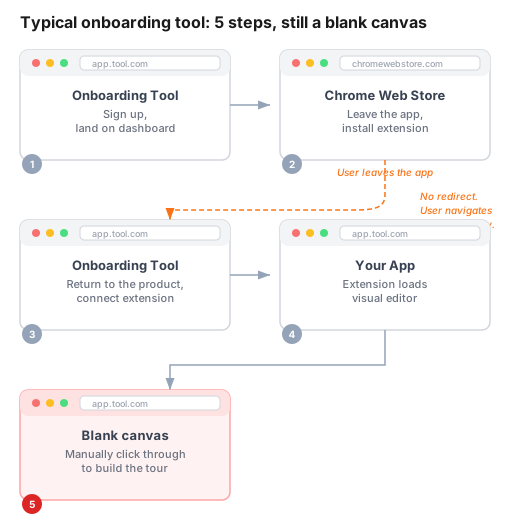
After five steps, the user is staring at a blank canvas. The actual tour building hasn’t even started yet. And step 2 is particularly rough because you’re asking a brand new user to leave your product, install third-party software, and find their way back. There’s no redirect. The user has to intentionally navigate back. Every one of those transitions is a chance for them to get distracted or give up.
When I was building FlowNavi, I reverse-engineered the experience from this observation. I wanted users to get to a working onboarding flow with as few steps as possible:
- Sign up
- Enter your app’s URL (this redirects you to a visual editor that loads your app)
- Log into your app
- Tell an AI agent what you want in plain language
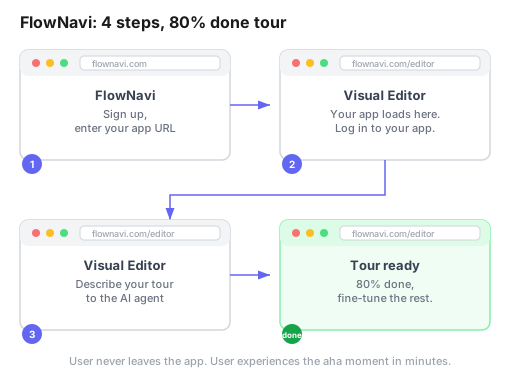
Four steps, and the user is looking at an 80% complete tour inside their own app. AI agents in early 2026 aren’t perfect, so the result won’t be exactly what you’d build by hand. But the user can fine-tune the details afterward, starting from something real instead of a blank canvas. Compare that to the five-step flow above where the user is still looking at an empty editor.
I’m not saying this to pitch my product. I’m saying it because the difference between these two approaches is entirely a product decision, not an onboarding decision. No amount of welcome emails or progress bars would fix the extension problem. The only fix was rethinking the product itself.
That’s what “steps to value” forces you to confront. Count the steps between signup and the moment the user thinks “okay, this is useful.” Then ask: which of these steps exist because of product architecture choices, and which are genuinely necessary? Sometimes the best onboarding improvement isn’t adding a tooltip. It’s removing a step.
Three onboarding anti-patterns I’ve seen (and built)
It’s easy to find posts about what good onboarding looks like. It’s harder to find honest accounts of what bad onboarding looks like. I’ve been on both sides, including building some of the bad stuff myself.
The empty page
The most common anti-pattern is also the easiest to fix. A user signs up, lands on the main screen, and sees… nothing. An empty table. A blank dashboard. “No items found.”
I worked on an HR product that did exactly this. New users would create an account and land on a list view with zero entries and no indication of what to do next. The product was CS-led, so a rep would eventually walk them through it. But in the gap between account creation and the first CS call, users were staring at a void.
The fix was simple: a single “Create your first [item]” button and a brief explanation of what the page is for. That’s it. Not a full onboarding flow. Not a product tour. A button and a sentence. Even that minimal effort is a massive improvement over an empty page, because it answers the most basic question a new user has: “What am I supposed to do right now?”
The tour avalanche
This is another one I’m guilty of.
The product had a complex interface with many features. The instinct was to explain everything upfront so users wouldn’t get confused. So we built tours. Lots of tours. Open a page, see a tour. Complete it or dismiss it, navigate to the next page, another tour. Every section of the product had its own guided walkthrough.
Users found it overwhelming. Instead of helping them understand the product, the tours became another obstacle between them and actually using it. Some users dismissed every tour without reading it, which defeated the purpose entirely.
The lesson: onboarding works better when it follows game design principles. Good games don’t dump the entire control scheme on you in the first level. They introduce mechanics gradually, in context, as you need them. Your user doesn’t need to understand your reporting module during their first session. They need to understand the one thing that gets them to value. Everything else can wait.
The big ask
This is when onboarding requires the user to do something effortful before they’ve seen any reason to trust the product. Install an extension. Connect a third-party integration. Import their data from another tool. Invite their entire team.
Each of these might be necessary eventually, but front-loading them into the first session is risky. The user has no relationship with your product yet. They don’t know if it’s good. Asking them to invest effort at this stage is like asking someone to move in after a first date.
The alternative: let them experience value first, even in a limited way. Let them see a demo, play with sample data, or complete one small task. Build trust, then ask for investment.
One caveat: some products can’t avoid the big ask. Zapier’s entire value depends on connecting third-party accounts. There’s no way around it. In those cases, the ask itself isn’t the problem. The problem is whether the user understands why it’s worth the effort before they’re asked. That’s a marketing and messaging job: setting expectations before the user ever hits the signup page. Which circles back to onboarding being a company-wide effort, not a single department’s problem.
Onboarding is a product strategy, not a layer you add on top
Most teams treat customer onboarding as something you build after the product is done. Design the features, then figure out how to explain them to users.
I think you need to reverse that order. Onboarding needs to be part of the product strategy from the start. The product should be designed with the initial user experience in mind, because the product’s architecture determines how simple or painful onboarding can be.
Sometimes this means deliberately simplifying the product to make onboarding easier. That’s a real trade-off. Simplifying can mean reducing customizability, which might mean some power users find the product too limited. But if nobody gets through onboarding because the product is too complex to learn, those power user features don’t matter. There’s a balance to find, and it’s different for every product.
The question is: how do you find that balance? In my experience, you can’t figure it out from the PM side alone. A PM looking at the user journey might see a 10-step onboarding plan and try to optimize each step. An engineer looking at the same problem might say “if we restructure this data model, half of these steps disappear entirely.” That’s a fundamentally different kind of solution, and it only surfaces when engineering is involved in deciding what to build, not just how to build it. The best product teams I’ve worked on split ownership clearly: product owns the problem space (understanding what users need), engineering owns the implementation (how to build it), and the solution space (what to actually build) is shared. When onboarding decisions happen in that shared space, you’re more likely to find solutions that simplify the product itself, not just add more onboarding on top of it.
Where to start with your onboarding
If your SaaS product is struggling with user activation or early churn, here’s where I’d start:
Map your steps to value. Create a new account on your own product (or better, watch someone else do it). Count every click, every page load, every decision point between signup and the moment the user gets value. Write it down. Then look at that list and ask: which of these are product architecture problems, and which are onboarding problems? Product problems are often the higher-impact fix, but they also cost more engineering time. Weigh that trade-off honestly before deciding where to invest.
Design your empty states. If any screen in your product can be empty on first use, decide what the user should see instead of “nothing.” This is the highest-ROI onboarding work you can do because it’s simple to implement and it’s the literal first thing users encounter.
Start small with progressive disclosure. You don’t need to rebuild your UI. Start by identifying the one or two features that are irrelevant during a user’s first session. Can you hide them, grey them out, or move them to a secondary menu? Reducing visual noise during the first session makes the important things stand out.
Resist the urge to explain everything. Pick the one path that leads to value. Build onboarding around that path only. Everything else can be introduced later, in context, when the user actually needs it. If you’re not sure which features to prioritize, your onboarding checklist should have no more than 3 to 5 items. If it has more, you’re probably trying to do too much at once.
Track activation rate. Userpilot’s benchmarks across 62 B2B SaaS companies put the average activation rate at 37.5%. If you’re in that range or below, there’s significant room to improve. But don’t get lost in dashboards early on. If you have fewer than 50 signups a week, you’ll learn more from watching 5 session recordings than from any analytics tool.
No amount of process fixes a product that loses users on day one
63% of customers say that onboarding is an important factor in their purchase decision. That stat is usually cited to justify investing in CS processes or onboarding software, and that’s valid. But for self-serve and low-touch SaaS, the implication is different: the product is the onboarding. There’s no CSM to bridge the gap. The product has to stand on its own.
That’s a higher bar, and it means onboarding can’t be an afterthought. The decisions that make onboarding good or bad are product decisions: how many steps to value, how the empty states look, how much complexity you expose on day one, whether the first session leads to something useful or just a tour of features.
Most customer onboarding advice for SaaS focuses on the process layer: emails, kickoff calls, check-ins, playbooks. That layer matters. But underneath it, the product is doing the heavy lifting, or it isn’t. And no amount of process can compensate for a product that loses users before they see why it’s worth their time.